
recommended place to buy a computer in Israel
Have you chosen to invest in a new Mac? Remember that Apple computers are not usually cheap, but a proper comparison will

Usually know that you need to replace the battery when you click on the battery logo and an alert appears like service battery or replace now but even when such a message does not appear there can be various reasons we will mention in the article that will help us diagnose ourselves before going to the lab.
Sometimes, users tend to think that a battery replacement is required because it lasts less time than before but this is not always the case. Battery holds less time when the computer consumes more
power if you use most background software or work on software that consumes more memory.
Keep in mind that the new battery works just like the same battery you had when your computer was just purchased but that does not mean that if your computer worked X hours with Sierra and now that you have replaced the battery and you have Catalina it will work exactly those X hours. Most of the latest operating systems and software consume more energy than the software you had in the past so your comput
er will probably consume more energy to run them and accordingly the battery will run out faster.
* Do you have an X mark on the battery? This means that your Mac does not recognize the battery for one of two reasons – the battery is disconnected from the board or the Mac does not recognize the battery because it is defective and needs to be replaced.
• Do you have a swollen battery? One of the most common and dangerous problems that happens quite often is that the battery in the Mac swells. If you started to feel that it was difficult or impossible to click on the trapeze, the battery (which is just below it) probably swelled and pressed on it. If the Topkeys got a distortion for no good reason do not delay and bring us the computer for a quick battery replacement in just an hour. A battery that has started to swell will probably continue to swell and without timely care can cause irreversible damage to your Mac.
* Rapid percentage drop in battery? If there is a significant drop in battery percentage at a difference of seconds / minutes a sign that the battery needs to be replaced.
Important Information! Our batteries are genuine only and there is a danger of using non-genuine batteries that could harm your computer.
We test each battery at least once and yet on average one in 20 lithium batteries wherever they are, come with some minor damage that is impossible to notice during the test but with continuous use. Our batteries, like any other product come with a full warranty. If you feel that the battery is running out too fast or is faulty for any reason, let us know and we will replace it for you at no extra charge.
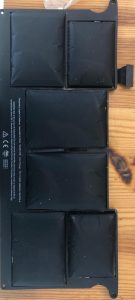
It is recommended to disconnect it from the charger from time to time and let it empty.
• Store your computer in a cool, ventilated place, especially during prolonged storage.
Use only original charger.
Click here or send us a message to schedule a battery replacement appointment within an hour
Have you chosen to invest in a new Mac? Remember that Apple computers are not usually cheap, but a proper comparison will
Despite the fact that the various Apple devices are considered to be of the highest quality and those that meet the highest

Do you have a bottle and need to replace the battery? At MacItNow you will receive professional service without waiting If you